Fabric and Azure
Does Copilot Work on a Microsoft Fabric Trial?
What actually works on a Microsoft Fabric trial, what it holds back, and what it costs to turn Copilot on. Tested in a live tenant.
Austin Levine
·
Updated
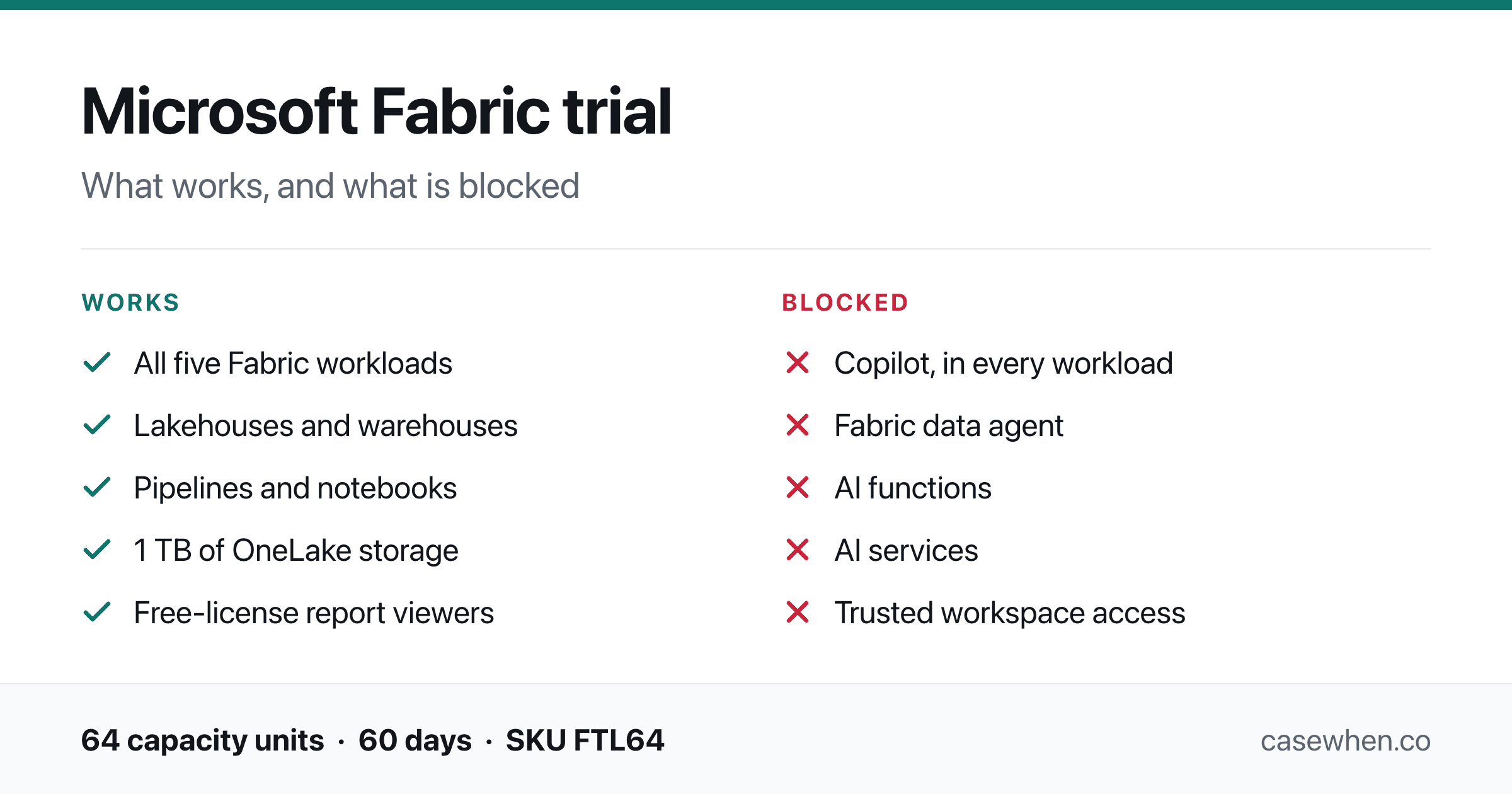
What a Fabric trial gives you, and what it holds back.
Quick answer
Copilot does not work on a Fabric trial capacity. Not in Power BI, not in pipelines, not in notebooks. It requires a paid capacity, and Microsoft's documentation is explicit that "trial capacities and free SKUs aren't supported." SKU is the product code Microsoft gives each capacity size, such as F64.
Three things follow from that:
It is not a setting you missed. Every Copilot switch in this tenant was already on. The block is the capacity type, and nothing in the admin portal changes it.
The trial is still worth running. Everything in Fabric that is not AI works, and that is most of it.
There is a way to get Copilot without leaving the trial. One small paid capacity, used only for billing. Covered below.
Tested on a live Fabric trial capacity, SKU FTL64, with every Copilot tenant setting read through the Fabric admin API rather than by eye.
Why a trial blocks it, when a Pro license does not
If you come from Power BI, you are used to software sold per person. You buy a Pro license for each person who needs one, and that is the whole model.
Fabric is sold differently. You rent an engine, called a capacity, and everything your organization does in Fabric runs on it. Capacities come in sizes: F2 is the smallest, then F4, F8, and up through F64 and beyond. You pay by the second for the size you pick, whether one person uses it or a hundred.
Copilot's cost is charged to that engine, not to a person. Every question you ask Copilot burns a measurable amount of the capacity you are renting. That is why no per-person license gets you Copilot. A Power BI Pro license is not enough. Premium Per User is not enough either. Microsoft says so directly: "A Power BI Pro or Premium Per User (PPU) license alone isn't sufficient."
The free trial gives you an engine, and a good one, typically equivalent to a 64-unit capacity, though Microsoft now provisions some tenants at only 4 units. Microsoft simply excludes it from the AI. You are renting the engine for free, so they do not let you spend it on the expensive part.
Microsoft 365 Copilot is a different product
Worth clearing up before anything else, because it causes more confusion than the rest of this article combined. Microsoft 365 Copilot answering questions from Power BI data is not Copilot in Fabric. It runs on a per-person Microsoft 365 Copilot seat, needs no Fabric capacity at all, and is on by default. Two products, two bills, one name.
It is not your settings, and it is not your admin
The first thing anyone does when Copilot does not appear is ask IT whether it has been turned off.
In the tenant these screenshots come from, every relevant setting is on.
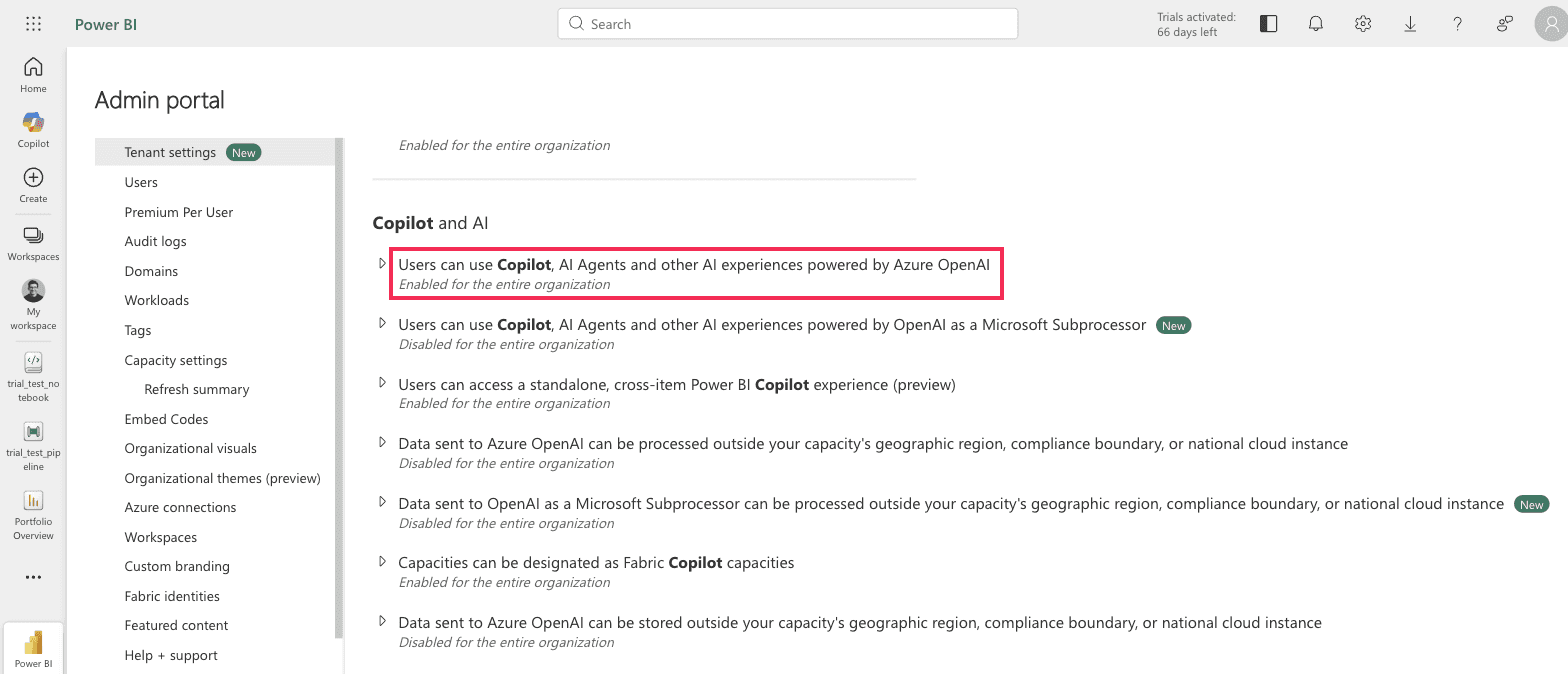
Fabric admin portal > Tenant settings > Copilot and AI. The main Copilot setting reads "Enabled for the entire organization."
With that setting on, opening Copilot from the Fabric navigation gives you this.
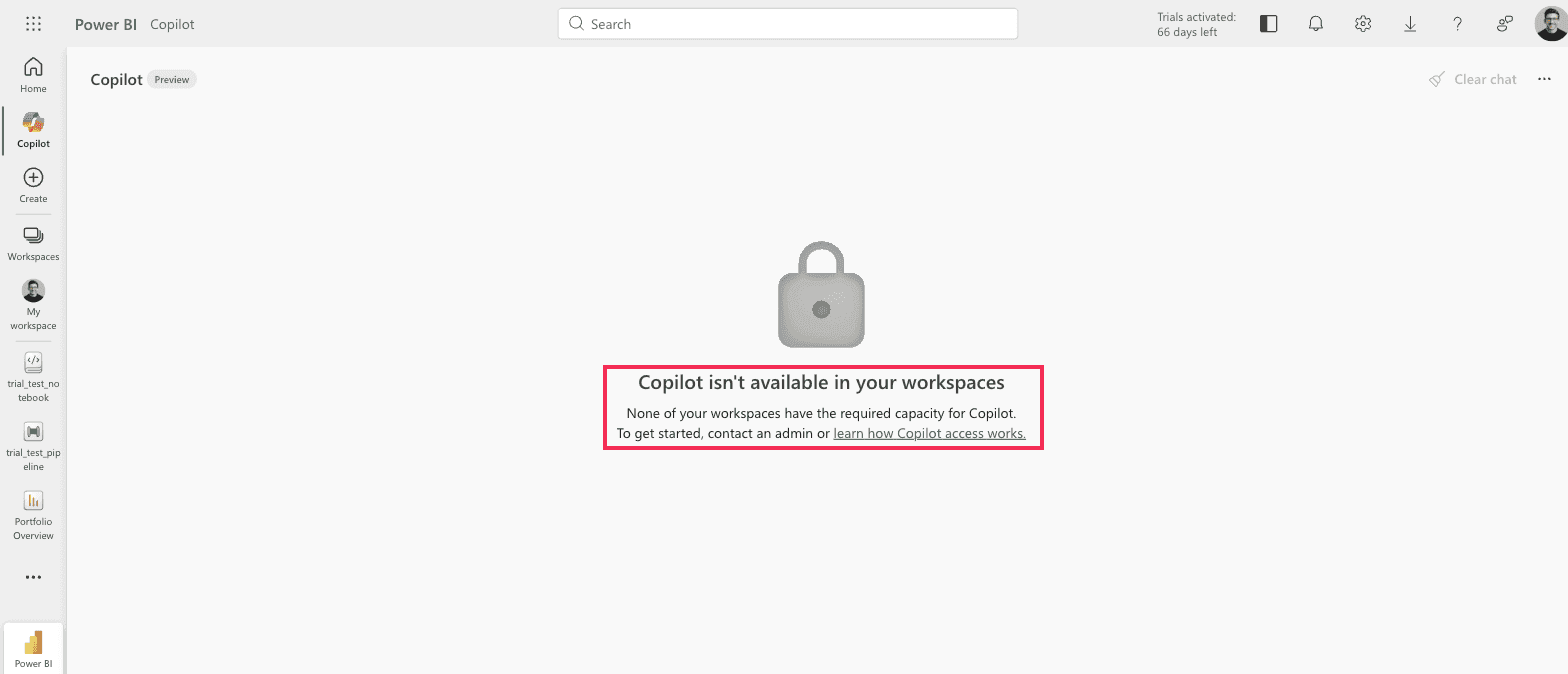
Power BI standalone Copilot on a trial capacity. "Copilot isn't available in your workspaces. None of your workspaces have the required capacity for Copilot. To get started, contact an admin."
It tells you to contact an admin. In this tenant the person reading that message is the Fabric administrator, the capacity administrator and the global administrator, and every switch is already on. There is no admin to contact and nothing left to enable.
The same block appears three different ways
Here is the same single cause, presented three ways in three parts of the product.
In a Power BI report, it blames your workspace.
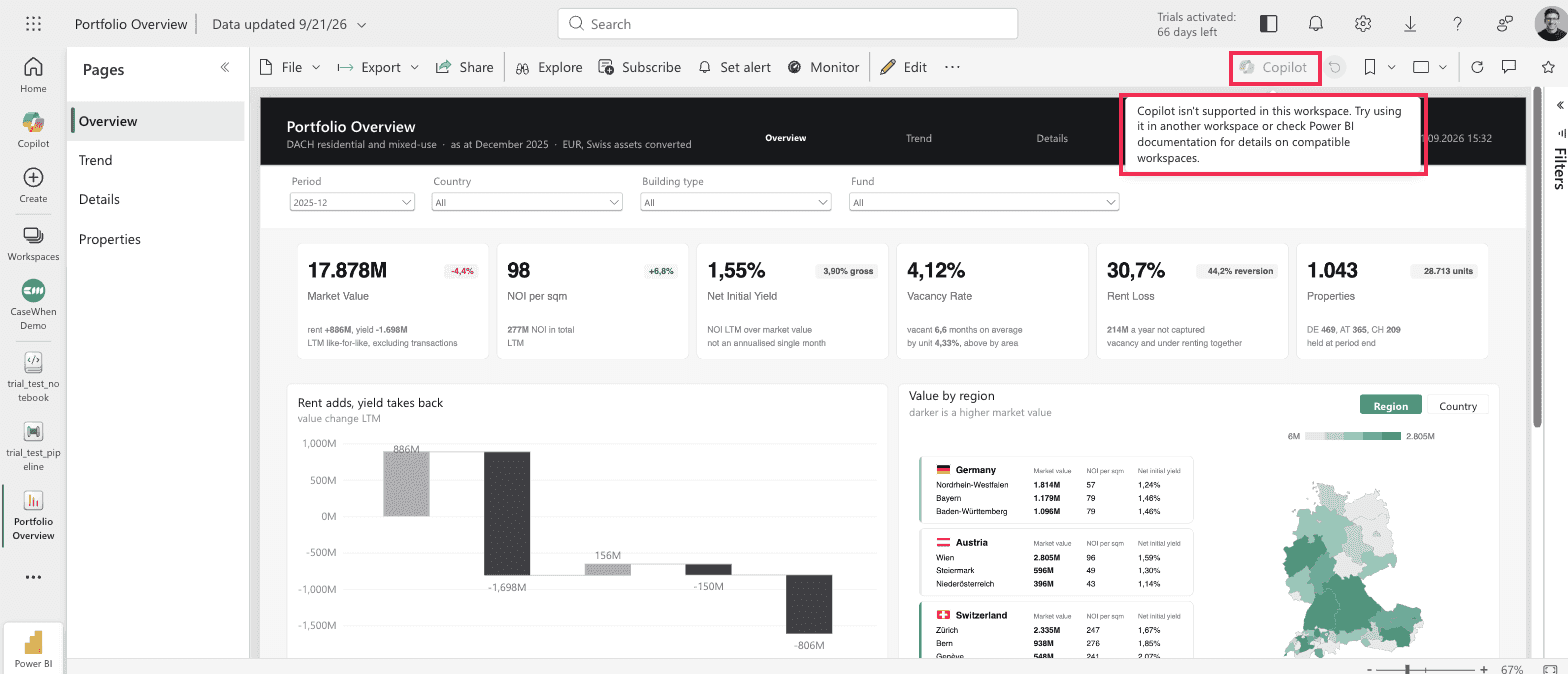
Power BI service, report in a trial workspace. Tooltip: "Copilot isn't supported in this workspace. Try using it in another workspace or check Power BI documentation for details on compatible workspaces."
The advice is to try a different workspace. On a trial, every workspace you can create sits on the same trial capacity, so every one of them fails identically. Nothing mentions the capacity or the trial, so the natural reading is that you set this workspace up wrong.
In a Data Factory pipeline, it says nothing at all.
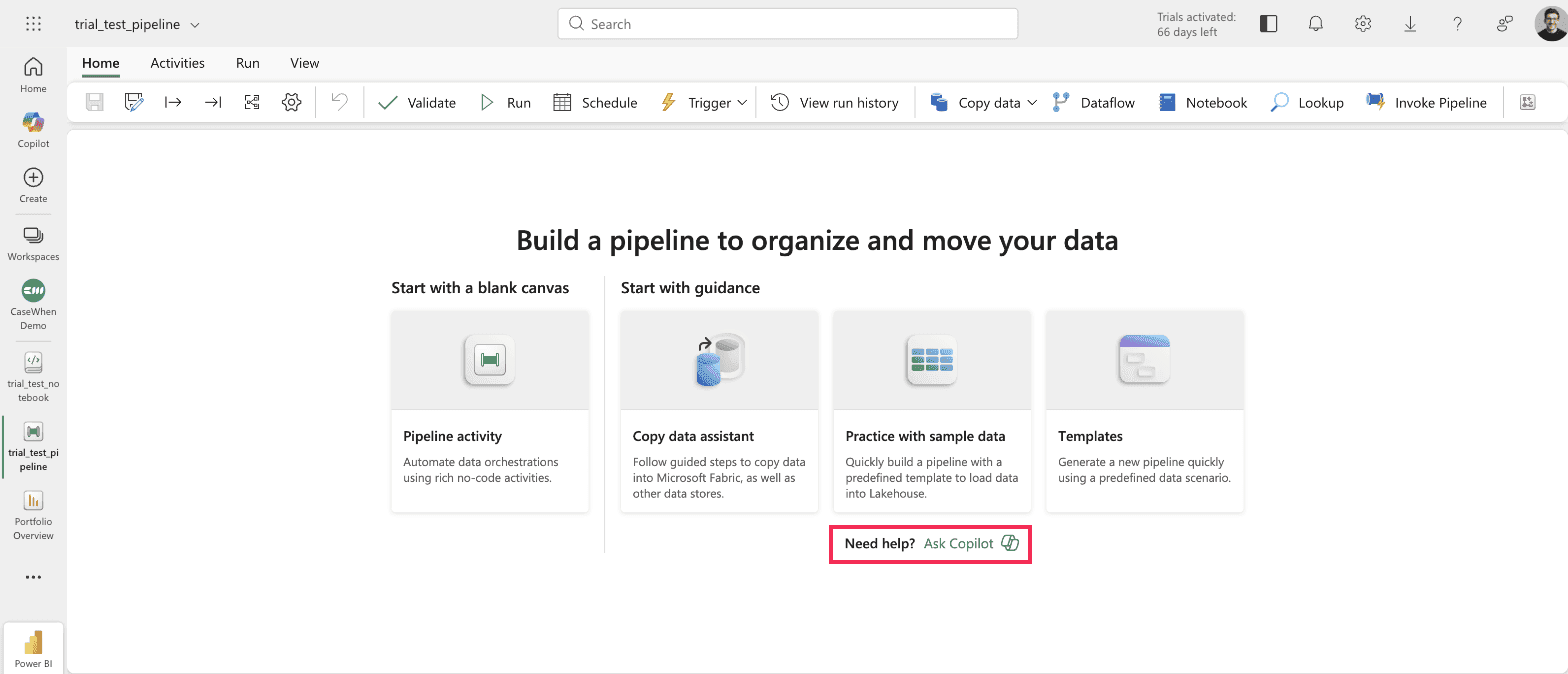
Fabric Data Factory, new data pipeline. The "Need help? Ask Copilot" prompt appears on the start screen. Clicking it, and clicking the Copilot button in the ribbon, produces nothing.
Fabric offers Copilot in the middle of the screen, on a capacity where it cannot run. Click it and nothing happens. No pane, no message, nothing logged. That silence is by design rather than a local fault: Microsoft's own Data Factory Copilot page states that when it cannot run, "it doesn't give an error message either."
In a notebook, it finally names the cause.
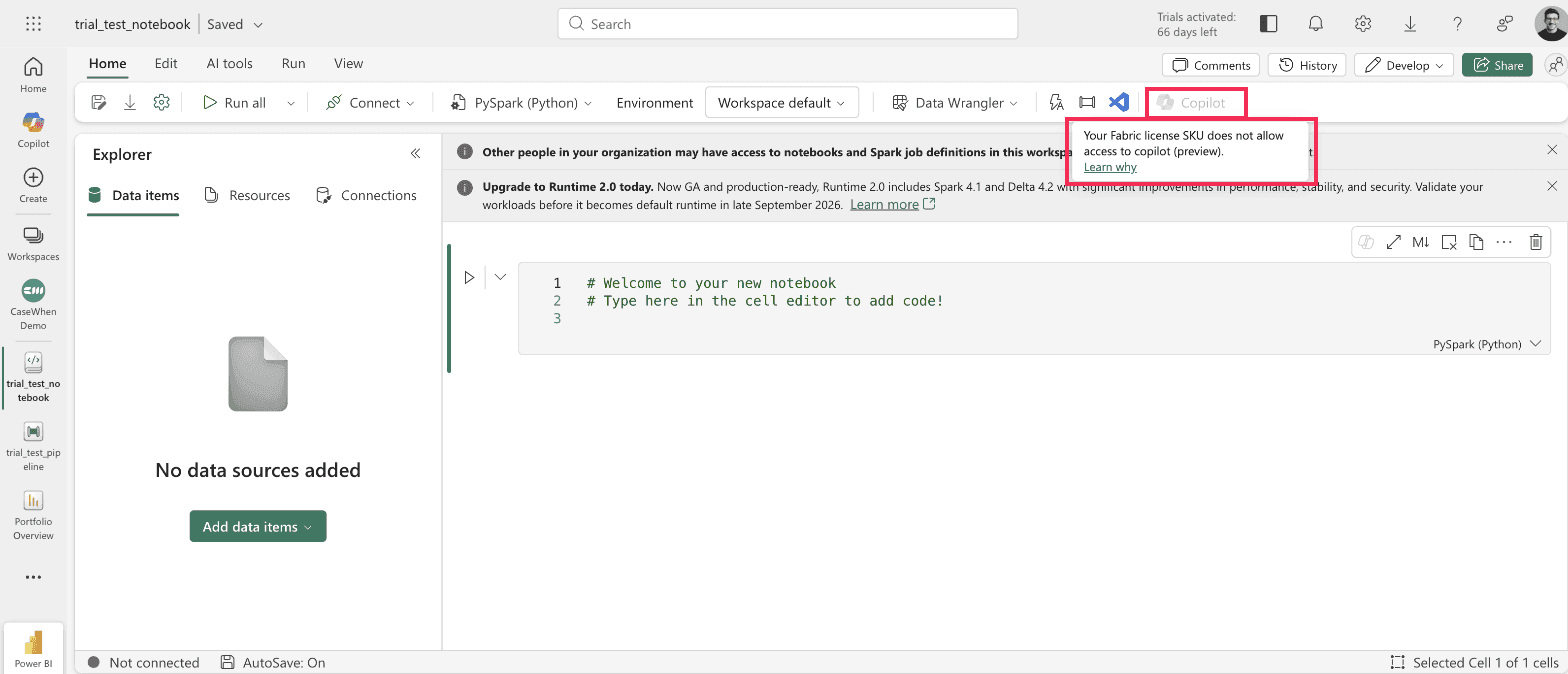
Fabric notebook. Tooltip: "Your Fabric license SKU does not allow access to copilot (preview)."
Two AI features let you start, then fail later
Microsoft's trial documentation says AI experiences "such as Data agent, AI functions and AI services aren't supported" on a trial. The product does not stop you from starting them.
Data agents appear in the create menu like any other item.
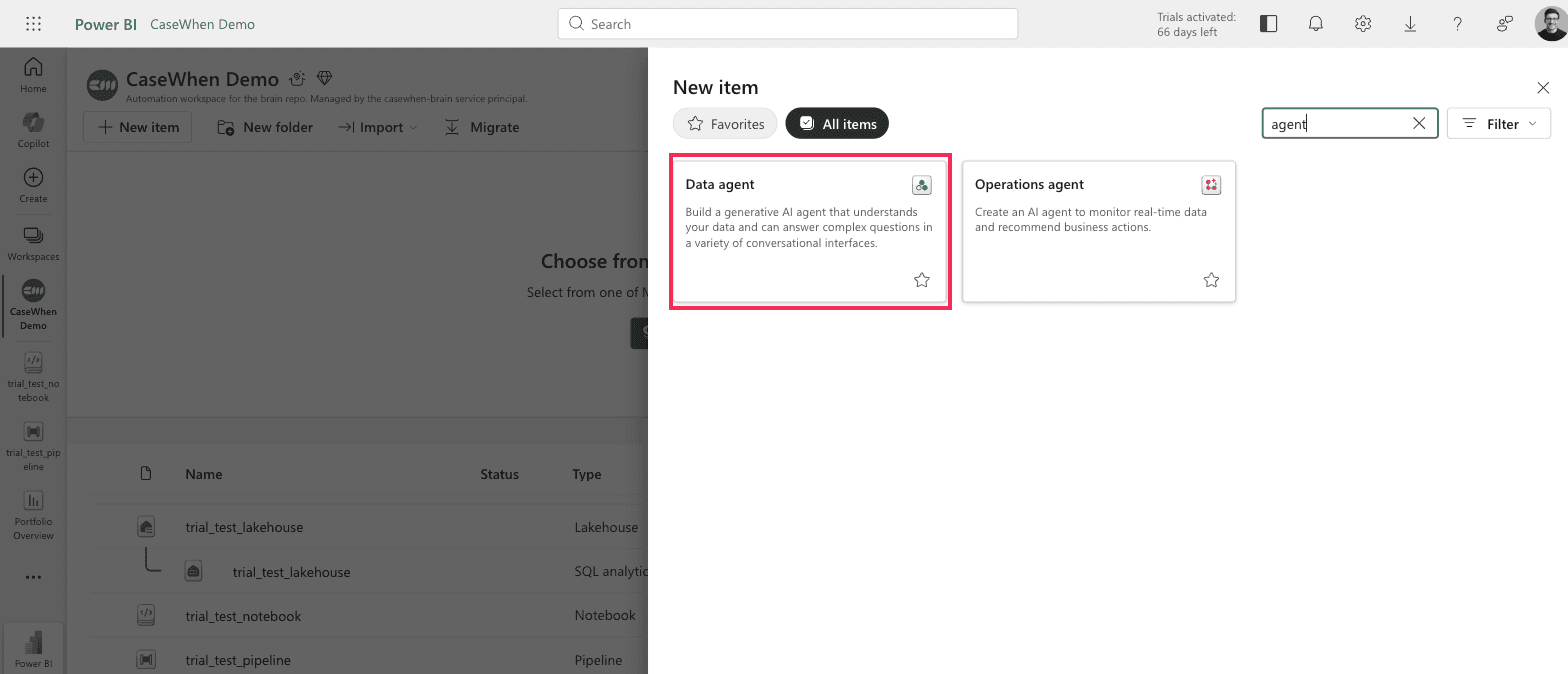
Fabric New item panel on a trial capacity. Data agent and Operations agent are both offered, described normally, with no notice that a trial capacity cannot run them.
You can click straight through, name it, and only then find out.
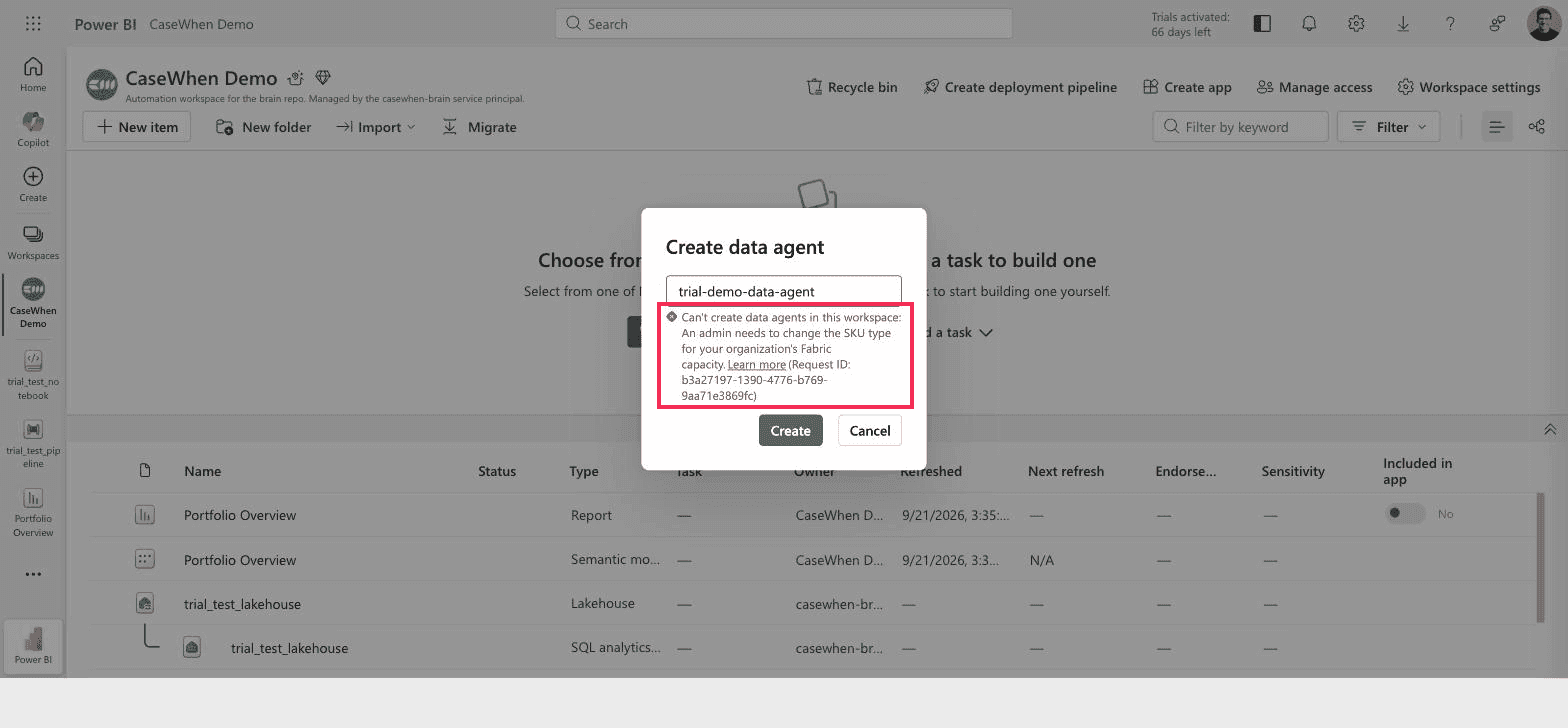
Create data agent dialog on a trial capacity. "Can't create data agents in this workspace: An admin needs to change the SKU type for your organization's Fabric capacity."
"An admin needs to change the SKU type" means "somebody has to buy a paid capacity." If you are the admin, as you usually are on a trial, there is nothing for you to change.
Creating the same item through the Fabric REST API drops the euphemism:
{
  "errorCode": "UnsupportedCapacitySKU",
  "message": "FTL64 SKU Not Supported"
}
AI functions open a full setup pane.
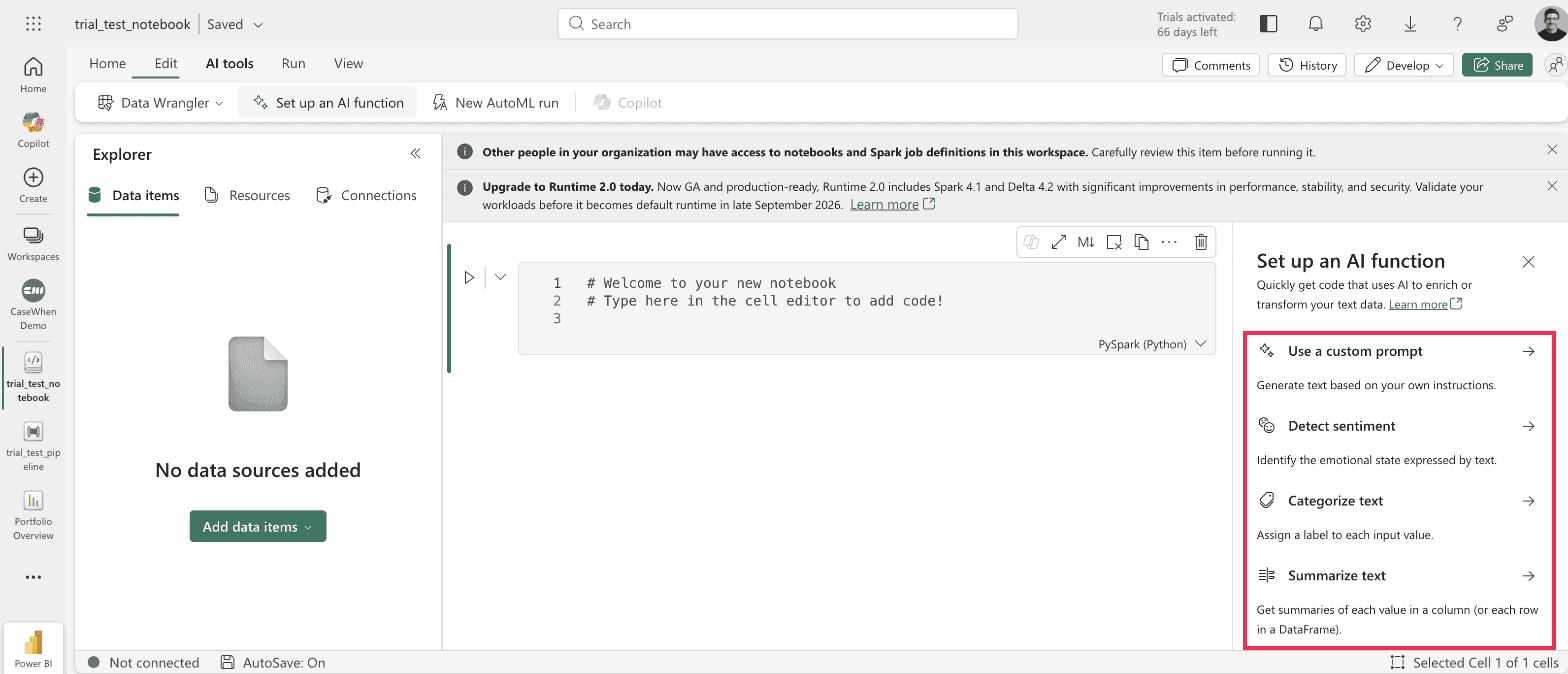
Fabric notebook, AI tools > Set up an AI function, on a trial capacity. The pane opens and offers four AI functions. The code it generates needs a paid capacity to run.
In both cases the feature is discoverable, configurable, and will let you invest time in it. The failure is deferred until you try to run it. Evaluating against a deadline, that is the part that costs you a day.
What the trial is genuinely good for
None of the above makes the trial a waste. It is 60 days of a 64-unit capacity, free, and it covers almost everything that is not AI.
A data pipeline, a notebook and a lakehouse all create and open on a trial capacity without complaint.
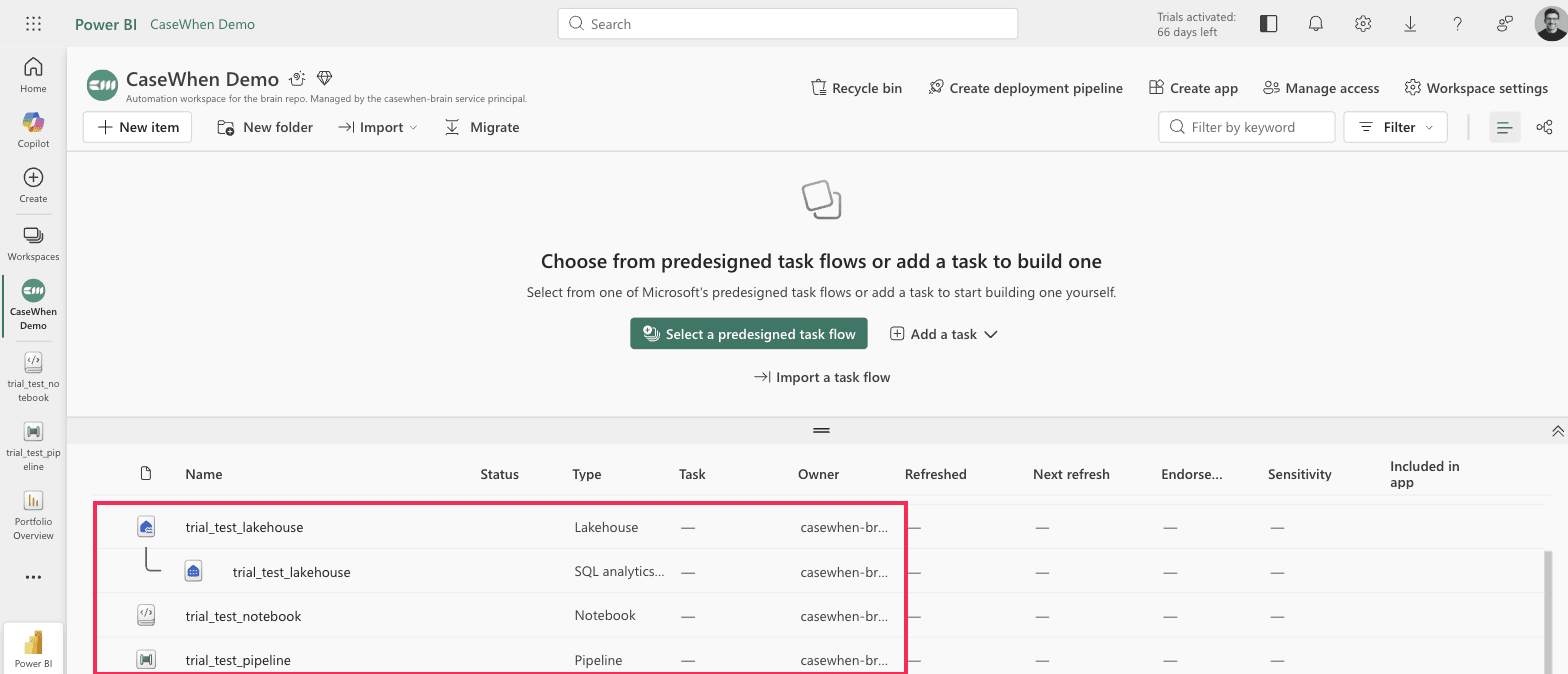
A workspace on a trial capacity after creating three items: a lakehouse with its SQL analytics endpoint, a notebook and a pipeline, all working.
One benefit is easy to miss, and it matters when you decide what to buy. A trial capacity behaves like an F64 for viewing, so colleagues holding only a free license can open your Power BI reports. On any paid capacity below F64 they cannot: every viewer needs Pro or PPU.
Microsoft now provisions trials at either 4 or 64 capacity units depending on the tenant, and a 4 can often be raised under Admin portal > Capacity settings > Trial > Change size.
Inviting a colleague onto the trial added 7 days to it. The counter read 59 days left, we invited someone onto the capacity, and it read 66. No Microsoft page documents this. The trial page names a sales representative as the only route to an extension, and it explicitly states that resizing the capacity does not extend the clock, so this is not that. Undocumented behavior can be withdrawn without notice, so take the extra week and do not plan around getting it.

Fabric admin portal > Capacity settings > Trial. The description says "a 60-day free Fabric trial". The Days left column says 66, on a capacity one day old.
What you can and cannot do on a Fabric trial
AI features
Feature | On a trial | Notes |
|---|---|---|
Copilot in Power BI reports, DAX and summaries | No | Button visible, permanently grayed |
Copilot in Data Factory pipelines and dataflows | No | Offered on screen, does nothing when clicked |
Copilot in notebooks | No | Names the license SKU as the cause |
Copilot in Data Warehouse and SQL database | No | Same capacity requirement |
Copilot in Real-Time Intelligence and KQL | No | Same capacity requirement |
Fabric data agent | No | Create fails at the API |
AI functions | No | Setup pane opens, generated code cannot run |
AI services and Foundry tools | No | Excluded from trial capacity |
Microsoft 365 Copilot over Power BI data | Yes | Different product, per-user seat, no capacity needed |
Building and shipping
Feature | On a trial | Notes |
|---|---|---|
Lakehouses, warehouses, notebooks, pipelines, eventhouses | Yes | All five workloads included |
OneLake storage | Yes | Up to 1 TB |
Workspace collaboration and sharing | Yes | Invite colleagues into the trial capacity |
Capacity Metrics app | Yes | Useful for sizing the capacity you will actually buy |
Deployment pipelines and Git integration | Yes | Full application lifecycle, dev to production |
Direct Lake semantic models | Yes | Query lakehouse data without importing it |
Large models, 48 refreshes a day, XMLA endpoint | Yes | Via the Power BI individual trial included with it |
Free-license colleagues viewing your reports | Yes | Trial behaves like an F64. A paid F2 does not |
Platform and security
Feature | On a trial | Notes |
|---|---|---|
Managed private endpoints | Yes | Outbound connections from Fabric to your own network |
Trusted workspace access | No | Blocks the usual pattern for reaching firewalled storage |
Private Link | No | Disabled on trial capacity |
Pause and resume the capacity | No | Paid F SKUs only |
Autoscale and Spark autoscale billing | No | Fixed at the trial's capacity units |
ARM APIs and Terraform | No | No infrastructure-as-code against a trial capacity |
Customer-managed keys | No | Microsoft-managed encryption only |
Production workloads | No | Microsoft states the trial is for evaluation and testing only |
What happens when the 60 days run out
Worth knowing before you build anything substantial on it, because the answer is not "nothing".
When the trial expires, access to the trial capacity is revoked and any workspace assigned to it reverts to Power BI Pro. Your Power BI content survives that. Everything that is not a Power BI item does not. Lakehouses, warehouses, notebooks and pipelines remain in the tenant but become inactive. You then have seven days to recover them by assigning the workspace to a paid F or P capacity. After that window, Microsoft's retention policy applies.
Do not assume you can simply start again either. Microsoft states that eligibility for a second trial is not guaranteed and that repeated or successive trial usage may be restricted.
So a trial is a good place to prove an architecture, and a bad place to build anything you will still need after it expires.
How to get Copilot without leaving the trial
This is the part most people miss, and it is the reason the answer to the title question is not simply "pay up".
The smallest capacity that supports Copilot is an F2. Azure's retail pricing API returns €0.1889 per capacity unit per hour for Germany West Central in EUR, which puts an F2 at €0.38 an hour, or about €276 a month left running. Check your own region and currency, because both change the number. Paid capacities can be paused and a paused capacity costs only storage, so a few days of evaluation is single-digit euros rather than a monthly commitment.
An F2 sounds far too small to serve AI, and that is the objection worth answering, because Copilot has a reputation for needing an F64. Copilot requests are billed as background jobs and smoothed over 24 hours, not over the five-minute window interactive operations use. Microsoft's own worked example puts an F64 at "over 13,824 Copilot requests per day". An F2 is a thirty-second of that capacity, which still leaves a few hundred requests a day. For one person evaluating whether Copilot is any good, that is not the binding constraint. Sustained team use is a different question and a different SKU.
One number to keep an eye on: capacity overage bills at €0.5667 per CU-hour in the same region, three times the base rate. A small capacity is cheap until you burst past it.
The obvious move is to put your workspace on that F2. The obvious move is also a downgrade. Your trial behaves like an F64 for viewing; an F2 does not. The moment your workspace moves to an F2, every person who opens those reports needs a Pro or PPU license. The cheapest way to switch Copilot on is also the thing that stops your colleagues reading your reports.
There is an alternative. A Fabric Copilot capacity is one you designate purely to collect Copilot usage for a named group of people, wherever their content actually lives. Microsoft's specification lists Trial among the workspace types those people can then use Copilot on in Power BI. Read straight, that means one small F2 doing nothing but paying for Copilot, while your work stays on the free trial capacity.
Four things to know before you plan around it.
Two Microsoft pages disagree, and you will find that in one click. The Fabric Copilot capacity page lists Trial among the supported Power BI license modes. The Fabric trial page says flatly that "Copilot and Trusted Workspace Access aren't supported." Neither page acknowledges the other. The Copilot capacity page is the more specific one and is the reason this route is worth trying, but nobody should pretend the documentation settles it.
Trial is listed for Power BI only. Not for pipelines, notebooks or the warehouse. Do not assume those come with it.
AI functions are excluded outright, whatever else you set up.
The capacity must sit in your tenant's home region, and a user can belong to only one Copilot capacity at a time.
This is the one recommendation in this article that comes from Microsoft's documentation rather than from our own tenant. Everything else here was clicked. Given that two Learn pages contradict each other on exactly this point, test it on your own tenant before you build a plan on it.
One more thing catches people out. Buying a capacity does not give you Copilot immediately. Microsoft states that when you purchase or resize a capacity, "it can take up to 24 hours for Copilot to recognize the change." Do not book the demo for the same afternoon.
The bottom line
A Fabric trial answers "is this the right platform for us" very well, and cannot answer "will Copilot make my team faster" at all. Those are different questions and the trial only serves one of them.
If Copilot is the actual question, do not spend two weeks of trial time trying to make the button light up. Buy an F2 and designate it as a Fabric Copilot capacity. Assign yourself to it, wait out the 24-hour recognition window, and keep your work where it is on the trial. That is a few euros and an afternoon, and it is the only way to find out whether the thing behind the button is worth a monthly capacity bill.
If the platform is the question, use the 60 days properly: build the lakehouse, wire up the pipelines, put a Direct Lake model in front of real data, and watch the Capacity Metrics app while you do it. That tells you which F SKU you would actually need, which is the number the whole decision turns on.
Sources
Copilot for Power BI overview - Microsoft Learn
Fabric trial capacity - Microsoft Learn
Features by SKU and capacity - Microsoft Learn
Understand Microsoft Fabric licenses and capacity - Microsoft Learn
Fabric Copilot capacity - Microsoft Learn
Copilot for Data Factory - Microsoft Learn
Microsoft ships changes to Fabric monthly and settings pages move. Everything here was observed in a live tenant when this was published, and is worth re-checking before you rely on it.
What a Fabric trial gives you, and what it holds back.
Quick answer
Copilot does not work on a Fabric trial capacity. Not in Power BI, not in pipelines, not in notebooks. It requires a paid capacity, and Microsoft's documentation is explicit that "trial capacities and free SKUs aren't supported." SKU is the product code Microsoft gives each capacity size, such as F64.
Three things follow from that:
It is not a setting you missed. Every Copilot switch in this tenant was already on. The block is the capacity type, and nothing in the admin portal changes it.
The trial is still worth running. Everything in Fabric that is not AI works, and that is most of it.
There is a way to get Copilot without leaving the trial. One small paid capacity, used only for billing. Covered below.
Tested on a live Fabric trial capacity, SKU FTL64, with every Copilot tenant setting read through the Fabric admin API rather than by eye.
Why a trial blocks it, when a Pro license does not
If you come from Power BI, you are used to software sold per person. You buy a Pro license for each person who needs one, and that is the whole model.
Fabric is sold differently. You rent an engine, called a capacity, and everything your organization does in Fabric runs on it. Capacities come in sizes: F2 is the smallest, then F4, F8, and up through F64 and beyond. You pay by the second for the size you pick, whether one person uses it or a hundred.
Copilot's cost is charged to that engine, not to a person. Every question you ask Copilot burns a measurable amount of the capacity you are renting. That is why no per-person license gets you Copilot. A Power BI Pro license is not enough. Premium Per User is not enough either. Microsoft says so directly: "A Power BI Pro or Premium Per User (PPU) license alone isn't sufficient."
The free trial gives you an engine, and a good one, typically equivalent to a 64-unit capacity, though Microsoft now provisions some tenants at only 4 units. Microsoft simply excludes it from the AI. You are renting the engine for free, so they do not let you spend it on the expensive part.
Microsoft 365 Copilot is a different product
Worth clearing up before anything else, because it causes more confusion than the rest of this article combined. Microsoft 365 Copilot answering questions from Power BI data is not Copilot in Fabric. It runs on a per-person Microsoft 365 Copilot seat, needs no Fabric capacity at all, and is on by default. Two products, two bills, one name.
It is not your settings, and it is not your admin
The first thing anyone does when Copilot does not appear is ask IT whether it has been turned off.
In the tenant these screenshots come from, every relevant setting is on.
Fabric admin portal > Tenant settings > Copilot and AI. The main Copilot setting reads "Enabled for the entire organization."
With that setting on, opening Copilot from the Fabric navigation gives you this.
Power BI standalone Copilot on a trial capacity. "Copilot isn't available in your workspaces. None of your workspaces have the required capacity for Copilot. To get started, contact an admin."
It tells you to contact an admin. In this tenant the person reading that message is the Fabric administrator, the capacity administrator and the global administrator, and every switch is already on. There is no admin to contact and nothing left to enable.
The same block appears three different ways
Here is the same single cause, presented three ways in three parts of the product.
In a Power BI report, it blames your workspace.
Power BI service, report in a trial workspace. Tooltip: "Copilot isn't supported in this workspace. Try using it in another workspace or check Power BI documentation for details on compatible workspaces."
The advice is to try a different workspace. On a trial, every workspace you can create sits on the same trial capacity, so every one of them fails identically. Nothing mentions the capacity or the trial, so the natural reading is that you set this workspace up wrong.
In a Data Factory pipeline, it says nothing at all.
Fabric Data Factory, new data pipeline. The "Need help? Ask Copilot" prompt appears on the start screen. Clicking it, and clicking the Copilot button in the ribbon, produces nothing.
Fabric offers Copilot in the middle of the screen, on a capacity where it cannot run. Click it and nothing happens. No pane, no message, nothing logged. That silence is by design rather than a local fault: Microsoft's own Data Factory Copilot page states that when it cannot run, "it doesn't give an error message either."
In a notebook, it finally names the cause.
Fabric notebook. Tooltip: "Your Fabric license SKU does not allow access to copilot (preview)."
Two AI features let you start, then fail later
Microsoft's trial documentation says AI experiences "such as Data agent, AI functions and AI services aren't supported" on a trial. The product does not stop you from starting them.
Data agents appear in the create menu like any other item.
Fabric New item panel on a trial capacity. Data agent and Operations agent are both offered, described normally, with no notice that a trial capacity cannot run them.
You can click straight through, name it, and only then find out.
Create data agent dialog on a trial capacity. "Can't create data agents in this workspace: An admin needs to change the SKU type for your organization's Fabric capacity."
"An admin needs to change the SKU type" means "somebody has to buy a paid capacity." If you are the admin, as you usually are on a trial, there is nothing for you to change.
Creating the same item through the Fabric REST API drops the euphemism:
{
  "errorCode": "UnsupportedCapacitySKU",
  "message": "FTL64 SKU Not Supported"
}
AI functions open a full setup pane.
Fabric notebook, AI tools > Set up an AI function, on a trial capacity. The pane opens and offers four AI functions. The code it generates needs a paid capacity to run.
In both cases the feature is discoverable, configurable, and will let you invest time in it. The failure is deferred until you try to run it. Evaluating against a deadline, that is the part that costs you a day.
What the trial is genuinely good for
None of the above makes the trial a waste. It is 60 days of a 64-unit capacity, free, and it covers almost everything that is not AI.
A data pipeline, a notebook and a lakehouse all create and open on a trial capacity without complaint.
A workspace on a trial capacity after creating three items: a lakehouse with its SQL analytics endpoint, a notebook and a pipeline, all working.
One benefit is easy to miss, and it matters when you decide what to buy. A trial capacity behaves like an F64 for viewing, so colleagues holding only a free license can open your Power BI reports. On any paid capacity below F64 they cannot: every viewer needs Pro or PPU.
Microsoft now provisions trials at either 4 or 64 capacity units depending on the tenant, and a 4 can often be raised under Admin portal > Capacity settings > Trial > Change size.
Inviting a colleague onto the trial added 7 days to it. The counter read 59 days left, we invited someone onto the capacity, and it read 66. No Microsoft page documents this. The trial page names a sales representative as the only route to an extension, and it explicitly states that resizing the capacity does not extend the clock, so this is not that. Undocumented behavior can be withdrawn without notice, so take the extra week and do not plan around getting it.
Fabric admin portal > Capacity settings > Trial. The description says "a 60-day free Fabric trial". The Days left column says 66, on a capacity one day old.
What you can and cannot do on a Fabric trial
AI features
Feature | On a trial | Notes |
|---|---|---|
Copilot in Power BI reports, DAX and summaries | No | Button visible, permanently grayed |
Copilot in Data Factory pipelines and dataflows | No | Offered on screen, does nothing when clicked |
Copilot in notebooks | No | Names the license SKU as the cause |
Copilot in Data Warehouse and SQL database | No | Same capacity requirement |
Copilot in Real-Time Intelligence and KQL | No | Same capacity requirement |
Fabric data agent | No | Create fails at the API |
AI functions | No | Setup pane opens, generated code cannot run |
AI services and Foundry tools | No | Excluded from trial capacity |
Microsoft 365 Copilot over Power BI data | Yes | Different product, per-user seat, no capacity needed |
Building and shipping
Feature | On a trial | Notes |
|---|---|---|
Lakehouses, warehouses, notebooks, pipelines, eventhouses | Yes | All five workloads included |
OneLake storage | Yes | Up to 1 TB |
Workspace collaboration and sharing | Yes | Invite colleagues into the trial capacity |
Capacity Metrics app | Yes | Useful for sizing the capacity you will actually buy |
Deployment pipelines and Git integration | Yes | Full application lifecycle, dev to production |
Direct Lake semantic models | Yes | Query lakehouse data without importing it |
Large models, 48 refreshes a day, XMLA endpoint | Yes | Via the Power BI individual trial included with it |
Free-license colleagues viewing your reports | Yes | Trial behaves like an F64. A paid F2 does not |
Platform and security
Feature | On a trial | Notes |
|---|---|---|
Managed private endpoints | Yes | Outbound connections from Fabric to your own network |
Trusted workspace access | No | Blocks the usual pattern for reaching firewalled storage |
Private Link | No | Disabled on trial capacity |
Pause and resume the capacity | No | Paid F SKUs only |
Autoscale and Spark autoscale billing | No | Fixed at the trial's capacity units |
ARM APIs and Terraform | No | No infrastructure-as-code against a trial capacity |
Customer-managed keys | No | Microsoft-managed encryption only |
Production workloads | No | Microsoft states the trial is for evaluation and testing only |
What happens when the 60 days run out
Worth knowing before you build anything substantial on it, because the answer is not "nothing".
When the trial expires, access to the trial capacity is revoked and any workspace assigned to it reverts to Power BI Pro. Your Power BI content survives that. Everything that is not a Power BI item does not. Lakehouses, warehouses, notebooks and pipelines remain in the tenant but become inactive. You then have seven days to recover them by assigning the workspace to a paid F or P capacity. After that window, Microsoft's retention policy applies.
Do not assume you can simply start again either. Microsoft states that eligibility for a second trial is not guaranteed and that repeated or successive trial usage may be restricted.
So a trial is a good place to prove an architecture, and a bad place to build anything you will still need after it expires.
How to get Copilot without leaving the trial
This is the part most people miss, and it is the reason the answer to the title question is not simply "pay up".
The smallest capacity that supports Copilot is an F2. Azure's retail pricing API returns €0.1889 per capacity unit per hour for Germany West Central in EUR, which puts an F2 at €0.38 an hour, or about €276 a month left running. Check your own region and currency, because both change the number. Paid capacities can be paused and a paused capacity costs only storage, so a few days of evaluation is single-digit euros rather than a monthly commitment.
An F2 sounds far too small to serve AI, and that is the objection worth answering, because Copilot has a reputation for needing an F64. Copilot requests are billed as background jobs and smoothed over 24 hours, not over the five-minute window interactive operations use. Microsoft's own worked example puts an F64 at "over 13,824 Copilot requests per day". An F2 is a thirty-second of that capacity, which still leaves a few hundred requests a day. For one person evaluating whether Copilot is any good, that is not the binding constraint. Sustained team use is a different question and a different SKU.
One number to keep an eye on: capacity overage bills at €0.5667 per CU-hour in the same region, three times the base rate. A small capacity is cheap until you burst past it.
The obvious move is to put your workspace on that F2. The obvious move is also a downgrade. Your trial behaves like an F64 for viewing; an F2 does not. The moment your workspace moves to an F2, every person who opens those reports needs a Pro or PPU license. The cheapest way to switch Copilot on is also the thing that stops your colleagues reading your reports.
There is an alternative. A Fabric Copilot capacity is one you designate purely to collect Copilot usage for a named group of people, wherever their content actually lives. Microsoft's specification lists Trial among the workspace types those people can then use Copilot on in Power BI. Read straight, that means one small F2 doing nothing but paying for Copilot, while your work stays on the free trial capacity.
Four things to know before you plan around it.
Two Microsoft pages disagree, and you will find that in one click. The Fabric Copilot capacity page lists Trial among the supported Power BI license modes. The Fabric trial page says flatly that "Copilot and Trusted Workspace Access aren't supported." Neither page acknowledges the other. The Copilot capacity page is the more specific one and is the reason this route is worth trying, but nobody should pretend the documentation settles it.
Trial is listed for Power BI only. Not for pipelines, notebooks or the warehouse. Do not assume those come with it.
AI functions are excluded outright, whatever else you set up.
The capacity must sit in your tenant's home region, and a user can belong to only one Copilot capacity at a time.
This is the one recommendation in this article that comes from Microsoft's documentation rather than from our own tenant. Everything else here was clicked. Given that two Learn pages contradict each other on exactly this point, test it on your own tenant before you build a plan on it.
One more thing catches people out. Buying a capacity does not give you Copilot immediately. Microsoft states that when you purchase or resize a capacity, "it can take up to 24 hours for Copilot to recognize the change." Do not book the demo for the same afternoon.
The bottom line
A Fabric trial answers "is this the right platform for us" very well, and cannot answer "will Copilot make my team faster" at all. Those are different questions and the trial only serves one of them.
If Copilot is the actual question, do not spend two weeks of trial time trying to make the button light up. Buy an F2 and designate it as a Fabric Copilot capacity. Assign yourself to it, wait out the 24-hour recognition window, and keep your work where it is on the trial. That is a few euros and an afternoon, and it is the only way to find out whether the thing behind the button is worth a monthly capacity bill.
If the platform is the question, use the 60 days properly: build the lakehouse, wire up the pipelines, put a Direct Lake model in front of real data, and watch the Capacity Metrics app while you do it. That tells you which F SKU you would actually need, which is the number the whole decision turns on.
Sources
Copilot for Power BI overview - Microsoft Learn
Fabric trial capacity - Microsoft Learn
Features by SKU and capacity - Microsoft Learn
Understand Microsoft Fabric licenses and capacity - Microsoft Learn
Fabric Copilot capacity - Microsoft Learn
Copilot for Data Factory - Microsoft Learn
Microsoft ships changes to Fabric monthly and settings pages move. Everything here was observed in a live tenant when this was published, and is worth re-checking before you rely on it.
Show us your report nobody trusts.
1 · A 30-minute call.
2 · We look at your current reports together.
3 · We tell you what we would do.
Show us your report nobody trusts.
1 · A 30-minute call.
2 · We look at your current reports together.
3 · We tell you what we would do.
Show us your report nobody trusts.
1 · A 30-minute call.
2 · We look at your current reports together.
3 · We tell you what we would do.

CaseWhen is a Berlin BI consultancy that builds reporting that leaders can trust, on the Microsoft stack: Power BI, Fabric and Azure.
Berlin, Germany
Free tools
CaseWhen is a Berlin BI consultancy that builds reporting that leaders can trust, on the Microsoft stack: Power BI, Fabric and Azure.
Berlin, Germany
Free tools
CaseWhen is a Berlin BI consultancy that builds reporting that leaders can trust, on the Microsoft stack: Power BI, Fabric and Azure.
Berlin, Germany