Fabric and Azure
All you need to know about Recursive CTEs in SQL
How recursive CTEs work, with a worked T-SQL hierarchy, the RECURSIVE keyword by database, MAXRECURSION, and why Fabric Warehouse does not support them.
Austin Levine
·
Updated
A recursive CTE is a common table expression that refers to itself. It starts from a set of rows, the anchor, then repeatedly joins back to its own output until no new rows appear. You use it to walk hierarchies and chains: an employee's chain of managers, a bill of materials, or a parent-child account structure. In SQL Server and Azure SQL you write it with a plain WITH. PostgreSQL and MySQL require WITH RECURSIVE. Fabric Data Warehouse does not support recursive queries at all.
A normal CTE first
A CTE is a named, temporary result set defined with WITH and used by the statement that follows it. It exists only for that one statement.
WITH recent_orders AS (
SELECT customer_id, order_date
FROM dbo.orders
WHERE order_date >= DATEADD(month, -1, CAST(GETDATE() AS date))
)
SELECT customer_id, COUNT(*) AS num_orders
FROM recent_orders
GROUP BY customer_id;This is the same as a subquery, but easier to read, and you can reference it more than once in the statement that follows.
How a recursive CTE works
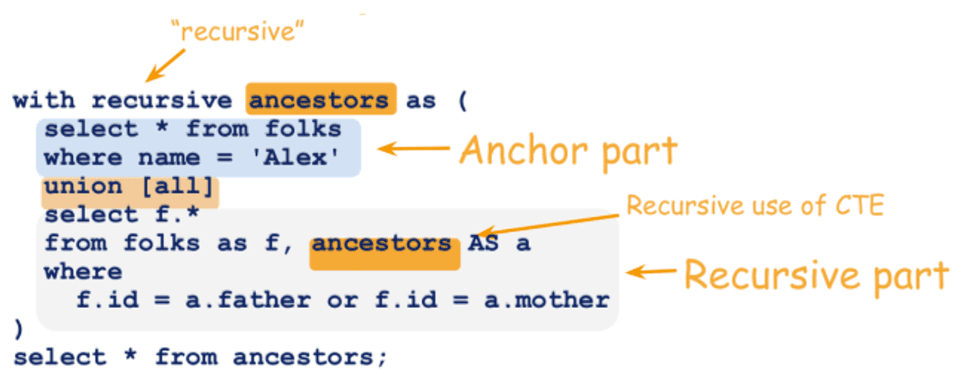
A recursive CTE has two parts joined by UNION ALL:
The anchor member runs once and produces the starting rows.
The recursive member references the CTE itself. It runs against the rows the previous step produced, and adds the rows it finds.
The recursive member keeps running until it returns no rows. Then all the steps are combined into one result.
Worked example: an employee hierarchy
Take an employees table where each row has a manager_id pointing at another employee. The CEO has no manager.
employee_id | name | manager_id |
|---|---|---|
1 | Ken | NULL |
2 | Brian | 1 |
3 | Stephen | 2 |
4 | Linda | 3 |
5 | Syed | 2 |
This query returns every employee with their level in the hierarchy:
WITH company_hierarchy (employee_id, name, manager_id, level) AS (
-- Anchor: the person with no manager
SELECT employee_id, name, manager_id, 1
FROM dbo.employees
WHERE manager_id IS NULL
UNION ALL
-- Recursive member: everyone who reports to someone already found
SELECT e.employee_id, e.name, e.manager_id, ch.level + 1
FROM dbo.employees AS e
INNER JOIN company_hierarchy AS ch
ON e.manager_id = ch.employee_id
)
SELECT employee_id, name, manager_id, level
FROM company_hierarchy
ORDER BY level, employee_id;Result:
employee_id | name | manager_id | level |
|---|---|---|---|
1 | Ken | NULL | 1 |
2 | Brian | 1 | 2 |
3 | Stephen | 2 | 3 |
5 | Syed | 2 | 3 |
4 | Linda | 3 | 4 |
Step by step: the anchor returns Ken. The first recursive pass finds Brian, who reports to Ken. The second finds Stephen and Syed. The third finds Linda. The fourth finds nobody, so recursion stops.
The RECURSIVE keyword depends on your database
Database | Syntax |
|---|---|
SQL Server, Azure SQL Database, Azure SQL Managed Instance |
|
PostgreSQL, MySQL 8+, MariaDB, SQLite |
|
The logic is the same everywhere. Only the keyword changes.
Stop runaway recursion with MAXRECURSION
If your data contains a loop, for example two employees recorded as each other's manager, the recursive member never stops finding rows. SQL Server protects you with a default limit of 100 levels. A query that goes deeper fails with an error saying the maximum recursion was exhausted.
You can change the limit with a hint on the outer statement, after the CTE definition:
-- WITH company_hierarchy AS ( ... ) as above, then:
SELECT employee_id, name, level
FROM company_hierarchy
OPTION (MAXRECURSION 500);The value can be from 0 to 32,767. 0 removes the limit, which you should only use when you are sure the data has no cycles. The OPTION clause goes on the outer query, never inside the CTE.
Rules for the recursive member in T-SQL
The anchor and recursive members must return the same number of columns with the same data types.
UNION ALLis the only operator allowed between the last anchor member and the first recursive member.The recursive member cannot use
SELECT DISTINCT,GROUP BY,HAVING,TOP, scalar aggregates, subqueries, orLEFT,RIGHTorOUTER JOIN.INNER JOINis fine.The CTE can only be referenced once in the recursive member's
FROMclause.
A frequent data type error: the anchor returns 1 as an int and the recursive member returns a computed varchar path. Cast both to the same type explicitly.
Where recursive CTEs do not work: Fabric and Synapse
Microsoft Fabric Data Warehouse and the SQL analytics endpoint of a Fabric lakehouse do not support recursive queries. Standard, sequential and nested CTEs work there, but a CTE that references itself does not. Azure Synapse dedicated SQL pools do not support them either.
If you need a hierarchy in Fabric, you have three options:
Flatten it once in a notebook or pipeline and store each employee's full path and level as columns. This is usually the best answer, because Power BI also wants a flattened hierarchy.
Use a fixed number of self-joins when the depth is known and small, such as three levels of a chart of accounts.
Run the recursive query in a source that supports it, such as Azure SQL Database, and load the result.
Recursive CTEs and Power BI
Power BI handles parent-child hierarchies with the DAX PATH functions, but those only work inside the model. For large hierarchies it is often cleaner to flatten the structure in SQL with a recursive CTE, store one column per level, and let Power BI build a normal hierarchy from those columns. That keeps the model simple, as our data modeling best practices recommend.
When to use one, and when not to
Good uses:
Organization charts and reporting lines
Bills of materials and product assemblies
Account hierarchies and cost center trees
Generating a sequence, such as one row per day between two dates, where no calendar table exists
Not a good use:
Running totals. A window function such as
SUM(amount) OVER (ORDER BY order_date)is simpler and much faster.
For another SQL function that often confuses people moving between databases, see our guide to BigQuery's TO_JSON_STRING. If you are choosing a Fabric data store, Why choose Microsoft Fabric compares the lakehouse and the warehouse.
Sources
WITH common_table_expression (Transact-SQL) - Microsoft Learn
T-SQL surface area in Fabric Data Warehouse - Microsoft Learn
A recursive CTE is a common table expression that refers to itself. It starts from a set of rows, the anchor, then repeatedly joins back to its own output until no new rows appear. You use it to walk hierarchies and chains: an employee's chain of managers, a bill of materials, or a parent-child account structure. In SQL Server and Azure SQL you write it with a plain WITH. PostgreSQL and MySQL require WITH RECURSIVE. Fabric Data Warehouse does not support recursive queries at all.
A normal CTE first
A CTE is a named, temporary result set defined with WITH and used by the statement that follows it. It exists only for that one statement.
WITH recent_orders AS (
SELECT customer_id, order_date
FROM dbo.orders
WHERE order_date >= DATEADD(month, -1, CAST(GETDATE() AS date))
)
SELECT customer_id, COUNT(*) AS num_orders
FROM recent_orders
GROUP BY customer_id;This is the same as a subquery, but easier to read, and you can reference it more than once in the statement that follows.
How a recursive CTE works
A recursive CTE has two parts joined by UNION ALL:
The anchor member runs once and produces the starting rows.
The recursive member references the CTE itself. It runs against the rows the previous step produced, and adds the rows it finds.
The recursive member keeps running until it returns no rows. Then all the steps are combined into one result.
Worked example: an employee hierarchy
Take an employees table where each row has a manager_id pointing at another employee. The CEO has no manager.
employee_id | name | manager_id |
|---|---|---|
1 | Ken | NULL |
2 | Brian | 1 |
3 | Stephen | 2 |
4 | Linda | 3 |
5 | Syed | 2 |
This query returns every employee with their level in the hierarchy:
WITH company_hierarchy (employee_id, name, manager_id, level) AS (
-- Anchor: the person with no manager
SELECT employee_id, name, manager_id, 1
FROM dbo.employees
WHERE manager_id IS NULL
UNION ALL
-- Recursive member: everyone who reports to someone already found
SELECT e.employee_id, e.name, e.manager_id, ch.level + 1
FROM dbo.employees AS e
INNER JOIN company_hierarchy AS ch
ON e.manager_id = ch.employee_id
)
SELECT employee_id, name, manager_id, level
FROM company_hierarchy
ORDER BY level, employee_id;Result:
employee_id | name | manager_id | level |
|---|---|---|---|
1 | Ken | NULL | 1 |
2 | Brian | 1 | 2 |
3 | Stephen | 2 | 3 |
5 | Syed | 2 | 3 |
4 | Linda | 3 | 4 |
Step by step: the anchor returns Ken. The first recursive pass finds Brian, who reports to Ken. The second finds Stephen and Syed. The third finds Linda. The fourth finds nobody, so recursion stops.
The RECURSIVE keyword depends on your database
Database | Syntax |
|---|---|
SQL Server, Azure SQL Database, Azure SQL Managed Instance |
|
PostgreSQL, MySQL 8+, MariaDB, SQLite |
|
The logic is the same everywhere. Only the keyword changes.
Stop runaway recursion with MAXRECURSION
If your data contains a loop, for example two employees recorded as each other's manager, the recursive member never stops finding rows. SQL Server protects you with a default limit of 100 levels. A query that goes deeper fails with an error saying the maximum recursion was exhausted.
You can change the limit with a hint on the outer statement, after the CTE definition:
-- WITH company_hierarchy AS ( ... ) as above, then:
SELECT employee_id, name, level
FROM company_hierarchy
OPTION (MAXRECURSION 500);The value can be from 0 to 32,767. 0 removes the limit, which you should only use when you are sure the data has no cycles. The OPTION clause goes on the outer query, never inside the CTE.
Rules for the recursive member in T-SQL
The anchor and recursive members must return the same number of columns with the same data types.
UNION ALLis the only operator allowed between the last anchor member and the first recursive member.The recursive member cannot use
SELECT DISTINCT,GROUP BY,HAVING,TOP, scalar aggregates, subqueries, orLEFT,RIGHTorOUTER JOIN.INNER JOINis fine.The CTE can only be referenced once in the recursive member's
FROMclause.
A frequent data type error: the anchor returns 1 as an int and the recursive member returns a computed varchar path. Cast both to the same type explicitly.
Where recursive CTEs do not work: Fabric and Synapse
Microsoft Fabric Data Warehouse and the SQL analytics endpoint of a Fabric lakehouse do not support recursive queries. Standard, sequential and nested CTEs work there, but a CTE that references itself does not. Azure Synapse dedicated SQL pools do not support them either.
If you need a hierarchy in Fabric, you have three options:
Flatten it once in a notebook or pipeline and store each employee's full path and level as columns. This is usually the best answer, because Power BI also wants a flattened hierarchy.
Use a fixed number of self-joins when the depth is known and small, such as three levels of a chart of accounts.
Run the recursive query in a source that supports it, such as Azure SQL Database, and load the result.
Recursive CTEs and Power BI
Power BI handles parent-child hierarchies with the DAX PATH functions, but those only work inside the model. For large hierarchies it is often cleaner to flatten the structure in SQL with a recursive CTE, store one column per level, and let Power BI build a normal hierarchy from those columns. That keeps the model simple, as our data modeling best practices recommend.
When to use one, and when not to
Good uses:
Organization charts and reporting lines
Bills of materials and product assemblies
Account hierarchies and cost center trees
Generating a sequence, such as one row per day between two dates, where no calendar table exists
Not a good use:
Running totals. A window function such as
SUM(amount) OVER (ORDER BY order_date)is simpler and much faster.
For another SQL function that often confuses people moving between databases, see our guide to BigQuery's TO_JSON_STRING. If you are choosing a Fabric data store, Why choose Microsoft Fabric compares the lakehouse and the warehouse.
Sources
WITH common_table_expression (Transact-SQL) - Microsoft Learn
T-SQL surface area in Fabric Data Warehouse - Microsoft Learn
Show us your report nobody trusts.
1 · A 30-minute call.
2 · We look at your current reports together.
3 · We tell you what we would do.
Show us your report nobody trusts.
1 · A 30-minute call.
2 · We look at your current reports together.
3 · We tell you what we would do.
Show us your report nobody trusts.
1 · A 30-minute call.
2 · We look at your current reports together.
3 · We tell you what we would do.
CaseWhen is a Berlin BI consultancy that builds reporting that leaders can trust, on the Microsoft stack: Power BI, Fabric and Azure.
Berlin, Germany
Free tools
CaseWhen is a Berlin BI consultancy that builds reporting that leaders can trust, on the Microsoft stack: Power BI, Fabric and Azure.
Berlin, Germany
Free tools
CaseWhen is a Berlin BI consultancy that builds reporting that leaders can trust, on the Microsoft stack: Power BI, Fabric and Azure.
Berlin, Germany